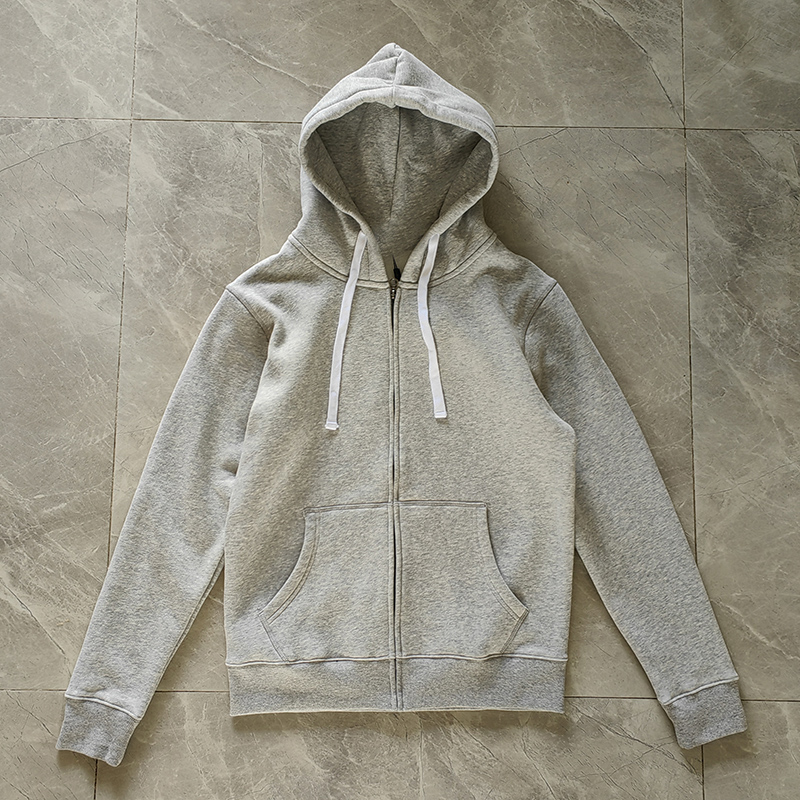
A quality control (QC) check for items found via CNFans is a critical verification step where your shopping agent sends you detailed photos of your product from their warehouse *before* it is shipped internationally. This allows you to inspect the item for quality, accuracy, and defects, giving you the power to approve (Green Light) or reject (Red Light) it. This process is your final opportunity to ensure the product meets your expectations before it begins its journey to you.
Table of Contents
- Clarifying the Roles: CNFans vs. Your Shopping Agent
- The Step-by-Step QC Check Process
- How to Analyze Your QC Photos Like an Expert
- What Do "GL" (Green Light) and "RL" (Red Light) Mean?
- What Happens When an Item Fails the QC Check?
- Maximizing Your QC Success: Pro Tips and Tricks
- Why Finding a Good Seller on CNFans is the First Step to Quality
- Understanding QC Photo Options: Free vs. Detailed Photos
- The Role of the Community in QC Checks
- Frequently Asked Questions About CNFans QC Checks
Clarifying the Roles: CNFans vs. Your Shopping Agent
To master the quality check, you must first understand who does what. It's a common point of confusion for newcomers. Think of it as a team effort where each party has a distinct and vital role.

CNFans is your expert navigator and resource hub. The primary tool, the CNFans Spreadsheet, is a curated database filled with thousands of product finds. Its purpose is to simplify your discovery process by vetting and organizing links to items from various sellers. CNFans does the legwork of finding promising products and reputable sellers, saving you countless hours of searching. However, CNFans never physically handles your items. They provide the map; they don't drive the car.
Your Shopping Agent (such as Pandabuy, Sugargoo, Hagobuy, etc.) is your logistical partner in China. After you find an item on the CNFans spreadsheet and decide to purchase it, you use the agent's platform. The agent's responsibilities include: purchasing the item from the seller on your behalf, receiving it at their warehouse, and, most importantly, performing the QC check by taking photographs and sending them to you for approval. They are your eyes and hands on the ground.
The Step-by-Step QC Check Process
Navigating the quality inspection process is straightforward once you understand the sequence of events. From finding your item to giving the final approval, here is how it typically unfolds.
1. Find Your Product: You begin by browsing the CNFans Spreadsheet to find a product you wish to purchase from a specific seller.
2. Place Your Order: You copy the product link and paste it into your preferred shopping agent's order form. You complete the purchase through the agent's platform.
3. Arrival at the Warehouse: The seller ships your item to the shopping agent's warehouse. This usually takes a few days. Once it arrives, the agent logs it into their system and assigns it to your user account.
4. QC Photos are Taken: The agent's warehouse staff will take a set of standard, free QC photos. These images are then uploaded to your order page on the agent's website. You will typically receive a notification that your item has arrived and is ready for inspection.
5. Your Inspection: This is your active role. You must log in to your agent account, view the photos, and carefully examine the item for any issues. Compare it to retail photos and the seller's original listing.
6. Make a Decision: Based on your inspection, you will decide whether to approve the item (Green Light) or reject it (Red Light). This decision is communicated back to the agent through their platform, usually by clicking a button to "Ship" or "Return/Exchange."
How to Analyze Your QC Photos Like an Expert
Receiving your first set of QC pictures can be exciting, but knowing what to look for is what separates a successful haul from a disappointing one. A systematic approach is best. Start with a general check before moving on to item-specific details.
General Checklist for All Items
Regardless of what you've ordered, these fundamental checks apply. Use this table as a quick reference for every QC inspection.
| Check Area | What to Look For |
|---|---|
| Color & Material | Does the color match the seller's photos and retail versions? Be aware warehouse lighting can affect color perception. Does the material texture look correct? |
| Symmetry & Alignment | Are logos, patterns, and stitching symmetrical? Is text straight? Are design elements properly aligned? |
| Stitching | Is the stitching neat, tight, and consistent? Look for loose threads, crooked lines, or sloppy finishing. |
| Tags & Labels | Are the neck tags, wash tags, and any exterior tags present and correctly spelled? Do they look accurate compared to authentic versions? |
| Flaws & Damage | Scan for any stains, rips, scuffs, or other signs of damage that may have occurred during domestic shipping. |
Specifics for Apparel (Hoodies, T-shirts)
For clothing, fit and the finer details are paramount. Beyond the general checklist, focus on these areas.
Print and Embroidery: For printed graphics, check for cracking, discoloration, or incorrect placement. The print should be centered and scaled correctly. For embroidery, examine the density and neatness. Poor embroidery often has gaps, fuzzy edges, or connected letters that shouldn't be.
Measurements: This is non-negotiable for apparel. Request measurement photos of the chest (pit to pit), length (shoulder to hem), and sleeve length. Compare these measurements to the seller's size chart and to a similar garment you own that fits well. Sizing can be inconsistent, and this is the only way to confirm the fit.
Specifics for Footwear (Sneakers)
Sneakers are often complex, with many details to scrutinize. Pay close attention to the overall shape and specific brand elements.
Shape and Profile: Does the shoe have the correct overall silhouette? Check the "toe box" shape (is it too bulky?), the heel curve, and the general stance of the shoe. Compare it directly with photos of a retail pair.
Logo and Text Placement: Whether it's a Nike Swoosh, an Adidas stripe, or text like "AIR," its placement, size, and angle are critical. A misplaced logo is an instant tell. Look at it from all angles provided.
Stitching and Panels: Examine the stitching around each panel of the shoe. It should be uniform and clean. Ensure the leather or fabric cuts are sharp and the panels are properly aligned. Also check the sole, including the tread pattern and any logos.
Specifics for Accessories (Bags, Belts)
For accessories like bags and belts, hardware and alignment are key indicators of quality.
Hardware: Check the color, finish, and engravings on all metal parts—zippers, buckles, clasps, and studs. Does the hardware feel cheap or lightweight? Are the engravings crisp and accurate? Zippers should have the correct branding and pull tabs.
Stamps and Monograms: For items with logos or monogram patterns, check for alignment across seams. The pattern should be continuous and not awkwardly cut off. Heat stamps or brand markings should be clear, well-defined, and correctly placed, not blurry or crooked.
What Do "GL" (Green Light) and "RL" (Red Light) Mean?
In the community, you'll constantly see the terms "GL" and "RL." These are simple but powerful abbreviations that signify your decision on a QC check.
GL (Green Light) means you have inspected the item and approve its quality. You are happy with the product shown in the photos and are giving your agent permission to prepare it for international shipping. Once you give an item the Green Light, it's considered accepted, and the process moves toward shipment.
RL (Red Light) means you have inspected the item and are rejecting it due to flaws, inaccuracies, or damage. You are not satisfied with the product and do not want it shipped to you. Giving an item the Red Light initiates the return or exchange process with your agent.
Deciding between GL and RL requires balancing perfection with practicality. Minor, unnoticeable flaws like a single loose thread that can be snipped might not be worth an RL. However, significant issues like incorrect spelling, a badly shaped logo, or wrong measurements are clear grounds for a Red Light.
What Happens When an Item Fails the QC Check?
So you've found a major flaw and decided to Red Light (RL) an item. What are your next steps? Your shopping agent facilitates this process, but you need to initiate it.
When you reject an item, you are typically presented with two choices on your agent's platform: Return or Exchange.
An Exchange means you are asking the agent to send the flawed item back to the seller and request a different one of the same product. This is a good option if you believe the flaw is a one-off defect and that the seller generally has good products. Be aware that this process takes time—the item has to be shipped back to the seller, and the seller has to ship a new one to the warehouse, where it will undergo a new QC check.
A Return means you are asking the agent to send the item back to the seller for a full refund. You choose this option if you've lost confidence in the seller or the product batch, or if you've simply changed your mind. The refunded amount will be credited to your agent account balance, which you can then use for another purchase or withdraw. Most sellers accept returns within a specific window (e.g., 7 days), but some may not, which is a risk to be aware of.
Maximizing Your QC Success: Pro Tips and Tricks
Going beyond the basics can significantly improve your QC outcomes and ensure you get exactly what you want. Implement these professional-level tips to take control of the process.
Always Request Measurements: Even if you don't see them initially, ask your agent for measurement photos for all apparel. Specify exactly what you need: chest width, garment length, and sleeve length. This is the single most effective way to avoid sizing issues.
Ask for Specific Photo Angles: The standard QC photos may not show a detail you're concerned about. Use the agent's service (often for a very small fee) to request custom photos. You can ask for close-ups of a specific logo, a picture of the inside of the shoe, or a photo of the wash tag. Be precise in your request.
Use Retail Photos for Comparison: Always have official retail photos of the item open while you examine your QC pictures. Put them side-by-side on your screen to compare color, placement, and proportions directly. This is the best way to spot inaccuracies.
Consider the Lighting: Warehouse lighting can be harsh and can make colors appear different. If a color seems slightly off, you can ask the community for their opinion or search for other QC photos of the same item to see if the color variance is consistent. You can also sometimes request photos in natural light, though this may come with a fee.
Why Finding a Good Seller on CNFans is the First Step to Quality
The quality control process doesn't start when the item reaches the warehouse; it starts when you choose your seller. A successful QC check is often the result of smart shopping from the very beginning. This is where the value of a curated resource like CNFans becomes evident.
The CNFans Spreadsheet is more than just a list of links; it’s a repository of community-vetted products and sellers. The spreadsheet often includes data points like seller return rates, user reviews, and in-hand photos from previous buyers. By using this information, you can strategically select sellers known for their consistency and quality. A seller with a high rating and positive feedback is far more likely to send a "Green Light" worthy item on the first try.
Choosing a well-regarded seller via CNFans reduces the likelihood of needing to RL an item. It saves you time, potential return shipping fees, and the frustration of dealing with exchanges. Your QC process becomes less about hunting for flaws and more about confirming a high-quality product. Starting with a trusted source is the ultimate strategy for a smooth and successful haul.
Understanding QC Photo Options: Free vs. Detailed Photos
When your item arrives at the warehouse, your agent provides a set of photos. It's important to know the difference between the standard, free photos and the optional, paid detailed photos.
Free QC Photos: These are the default pictures your agent takes for every item. The set usually includes 3 to 5 images showing the product from key angles: a top-down view, front, back, and perhaps a detail shot of a logo or tag. For many items, these free photos are sufficient to make a GL/RL decision, especially if you've chosen a reliable seller.
Detailed (Paid) Photos: For a small fee (typically a dollar or two), you can request additional, specific photos. This is an incredibly powerful tool. You can ask for anything you need to verify quality. Examples of useful paid photo requests include:
- Measurement photos for clothing.
- Close-up shots of stitching in a specific area.
- A photo of the shoe insole or the back of an embroidery.
- An image showing the texture of the material up close.
- A picture of the item under different lighting.
Investing in detailed photos is highly recommended, especially for more expensive items or products where specific details determine the quality. The small cost is excellent insurance against receiving a flawed product.
The Role of the Community in QC Checks
You are not alone in this process. One of the most valuable resources available to you is the vast community of fellow shoppers, often found on platforms like Reddit (e.g., r/FashionReps). When you are unsure about a QC check, you can post your photos and ask for a "QC" from more experienced users.
When posting for a community QC, be sure to include the seller's name and a link to the product. This context helps others give you an accurate assessment. Members can point out flaws you may have missed or, conversely, reassure you that a minor detail is not a significant issue. Tapping into this collective expertise is a smart way to build confidence in your decisions and learn the nuances of quality for different products and brands.
Frequently Asked Questions About CNFans QC Checks
How long does it take for an item to get to the warehouse for QC?
Typically, it takes 3-7 days for a seller to ship the item to your agent's warehouse. This can vary depending on the seller's location and processing speed.
What if a seller doesn't accept returns?
Some sellers, especially those offering clearance or specialty items, may have a no-return policy. Your agent will usually warn you about this before you purchase. If you buy from such a seller, you accept the risk and cannot RL the item unless it is clearly not what you ordered (e.g., wrong size or color sent).
Can I ask for a video QC?
Some agents are beginning to offer short video clips as a paid QC option. This can be useful for assessing the material and overall look of an item in motion. Check with your specific agent to see if this service is available.
Does using the CNFans Spreadsheet guarantee a perfect item?
No, it does not offer a guarantee, but it significantly increases your chances of success. The spreadsheet directs you to sellers with a proven track record, which is the best way to mitigate risk. The QC check remains your personal, final step for verification.