To use image search with the CNfans Spreadsheet, you simply upload a photo of the desired item directly into the CNfans search bar. The system will then scan Chinese marketplaces like Taobao and Weidian to find matching or similar products, providing you with direct links to purchase them through the CNfans platform. This method bypasses language barriers and the need for specific product names, making it an incredibly powerful tool for finding exactly what you're looking for.

Table of Contents
- What is Image Search and Why is it Essential?
- How Does the CNfans Image Search Function?
- Where Do You Find Images for Your Search?
- A Step-by-Step Walkthrough to Performing an Image Search
- How Do You Analyze the Search Results?
- What Makes a Good Image for a Successful Search?
- Why Isn't My Image Search Finding the Right Item?
- Can You Image Search for QC (Quality Check) Photos?
- What's the Difference Between Spreadsheet Items and Image Search Finds?
- How Can CNfans Simplify Your Purchase After a Successful Search?
What is Image Search and Why is it Essential?
Image search, often called reverse image search, is a technology that uses a picture as a search query instead of text. For shoppers seeking specific apparel, sneakers, or accessories, it is a game-changer. Instead of trying to guess keywords like "blue running shoe with orange swoosh," you can use an exact photo of the item. This eliminates ambiguity and significantly narrows down the results to what you truly want.
Its importance in the world of international shopping cannot be overstated. Many items on platforms like Weidian and Taobao have obscure or non-standardized names, often in Chinese. Image search completely bypasses this language barrier. It allows you to find a specific *batch* of a product, identify items seen on social media without a name, and discover sellers who carry the exact design you have in mind. It transforms a frustrating search into a simple, visual matching process.
How Does the CNfans Image Search Function?
The image search feature on the CNfans Spreadsheet website acts as a sophisticated and user-friendly portal to the vast inventories of Chinese online marketplaces. When you upload an image, our system doesn't just search our own curated spreadsheet; it leverages the powerful image recognition APIs of platforms like Taobao. It analyzes the visual data in your photo—colors, patterns, shapes, and logos—and cross-references it against millions of product listings.
Essentially, CNfans is doing the heavy lifting for you. It translates your visual query into a format that these marketplaces can understand and then neatly presents the findings to you. This integration means you get the best of both worlds: the massive product selection of giant Chinese platforms combined with the streamlined, English-language interface and support of CNfans.
Where Do You Find Images for Your Search?
The effectiveness of an image search begins with the quality of the source image. Excellent photos for searching can be found in numerous places. Social media platforms like Instagram, Pinterest, and Reddit communities (such as r/FashionReps or r/SneakerReps) are goldmines for high-quality product photos. Users often post clear, well-lit pictures of items they have found or received.
Other valuable sources include official brand retail sites, which provide clean "stock photos" of their products. You can also take a screenshot from a video review or even a photo of an item a friend owns. The key is to find an image that is as clear and direct as possible. Even a high-resolution Quality Check (QC) photo from another user's purchase can be used to track down the exact same item and batch.
A Step-by-Step Walkthrough to Performing an Image Search
Using the image search tool is a straightforward process designed for maximum efficiency. Following these steps will help you quickly locate the items you're after.
Navigating to the Search Function
Your starting point is the main search bar located prominently on the CNfans website. You will notice a standard text entry field and, next to it, a small camera icon. This icon is the gateway to the image search functionality. Clicking on it will open a new window or prompt, preparing the system to receive your image file.
Uploading Your Image
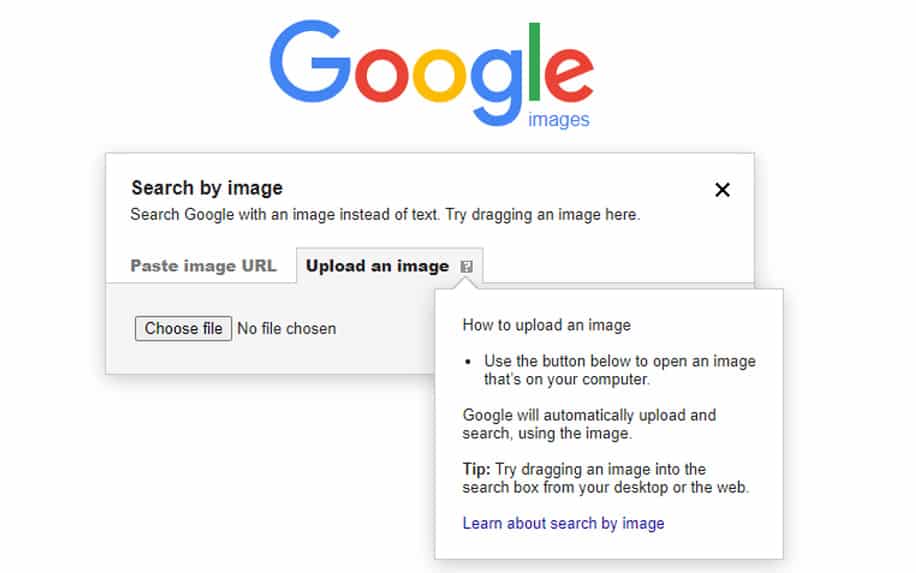
Once you've clicked the camera icon, you will be prompted to select an image from your device. You can either drag and drop an image file directly into the designated area or click to browse your computer or mobile phone's folders to locate and select the picture. After you select the image, the system will automatically upload it and begin the search process. There's no need to press an additional "search" button; the upload itself initiates the query.
Refining Your Results
The system will return a page filled with product listings that visually match your uploaded image. These results can be sorted and filtered to help you pinpoint the best option. You can typically sort by price (low to high or high to low), seller popularity, or sales volume. These filters are crucial for moving from a broad set of visual matches to the specific listing that meets your criteria for price and seller trustworthiness.
How Do You Analyze the Search Results?
Finding visual matches is only the first step. The true skill lies in interpreting the results to make an informed purchasing decision. Carefully examining each listing is critical to ensure you get the quality you expect.
Understanding Seller Ratings and Store History
Each listing is tied to a seller with a specific rating and history. Pay close attention to metrics like the seller's return rate and their overall store rating (often represented by symbols like hearts, diamonds, or crowns). A low return rate is a positive sign, indicating that previous buyers were satisfied with their purchases. A long-standing store with high ratings is generally more reliable than a brand-new shop with no track record. This information provides a layer of security for your purchase.
Comparing Prices and Batches
You will often find multiple listings for the same item at vastly different prices. This is because different factories produce different versions, or *batches*, of a product. A higher price does not always guarantee higher quality, but it can be an indicator. Look at product details and, if available, review photos from other buyers to determine which batch has the reputation for being the most accurate or well-made. Some listings may even specify the batch name in the title or description.
Reading Product Descriptions and Size Charts
Even though the image search bypasses the need to write in Chinese, the product descriptions remain vital. Use your browser's built-in translation feature (e.g., "Translate to English" in Chrome) to read the details. Look for information on materials, weight, and, most importantly, the size chart. Sizing can be inconsistent, so always measure a similar garment you own and compare it to the seller's provided chart to ensure a proper fit.
What Makes a Good Image for a Successful Search?
The principle of "garbage in, garbage out" applies perfectly to image search. The quality of your input image directly dictates the quality of your search results. To maximize your chances of success, your image should be as clear and uncluttered as possible. Cropping the image to focus only on the desired product is a crucial step; remove any distracting people, backgrounds, or other objects.
Below is a table that clarifies what constitutes a good versus a bad image for searching.
| Attribute | A Good Image for Searching | A Bad Image for Searching |
|---|---|---|
| Resolution | High-resolution, clear, and in focus. | Pixelated, blurry, or low-quality. |
| Background | Simple, neutral, or non-existent (studio shot). | Busy, cluttered, or with many other objects. |
| Focus | The item is the central and only subject. | The item is small, in a group, or in the background. |
| Angle | A direct, front-facing shot (like a product photo). | An extreme or awkward angle that distorts the item's shape. |
| Lighting | Bright, even lighting that shows true colors. | Dark, shadowed, or heavily filtered, altering the color. |
Why Isn't My Image Search Finding the Right Item?
Occasionally, an image search may not yield the expected results. This can happen for a variety of reasons, ranging from the image itself to the availability of the product. Understanding these potential issues can help you troubleshoot and refine your search strategy.
Common Image-Related Issues
The most frequent cause of a failed search is a poor-quality source image. If the photo is too blurry, dark, or taken from an odd angle, the recognition software will struggle to identify its key features. Likewise, a "busy" image with a cluttered background or multiple items can confuse the algorithm. Always try to find or create the cleanest possible image and crop it to feature only the product you want to find.
Dealing with No Results or Poor Matches
If a high-quality image still returns no results, it could mean a few things. The item might be Out of Stock (OOS) across all sellers. It could also be a "fantasy" piece, meaning it was a concept design that was never actually produced or sold. In some cases, the item may be too new and a replica version has not yet been manufactured. If you encounter this, try searching for a similar product or using text-based searches with descriptive terms as a backup plan.
Can You Image Search for QC (Quality Check) Photos?
Yes, and this is an advanced technique used by savvy shoppers. When another user posts their QC (Quality Check) photos from a CNfans warehouse, those images are a perfect representation of the actual product from a specific seller and batch. If you like what you see in their QC photos, you can save one of those images and use it in your own image search.
This method is highly effective because it often leads you directly back to the exact same product listing that the original person purchased from. It helps eliminate the guesswork in determining which seller has the superior batch, as you are starting your search with photographic evidence of the final product.
What's the Difference Between Spreadsheet Items and Image Search Finds?
It's important to understand the two primary ways of finding products via our platform. The CNfans Spreadsheet itself is a curated collection. These are items that have been found, and often vetted for quality and value, by the community or our team. It serves as an excellent starting point, especially for new users, showcasing popular and reliable finds.
Image search, on the other hand, is a discovery tool. It is not limited to what's on the spreadsheet. It empowers you to find *any* item you have a picture of, whether it's a niche product, a brand-new release, or something you saw in a store. The spreadsheet is a curated list of recommendations, while image search gives you the power to explore the entire market for yourself.
How Can CNfans Simplify Your Purchase After a Successful Search?
Finding the item is just the beginning. The process of buying from Chinese marketplaces, dealing with domestic shipping, and arranging international logistics can be complex. This is where the full CNfans service becomes indispensable. Once your image search leads you to a product link, your journey is far from over, but we make the next steps effortless.
After you add the item to your CNfans cart and check out, our team takes over. We purchase the product on your behalf from the Taobao or Weidian seller. It is then shipped to our secure warehouse, where we perform a thorough inspection. We take detailed QC photos and send them to you for approval, ensuring the item you bought is the item you receive. Once you approve, we professionally package your items and handle all the complexities of international shipping right to your doorstep. From search to delivery, CNfans provides a seamless, end-to-end solution.