The CNFans app is a mobile platform that simplifies purchasing goods directly from China. It functions as your personal shopping agent, enabling you to buy from popular e-commerce sites like Taobao, Weidian, and 1688. The service then consolidates your items, performs detailed quality checks, and ships everything to your doorstep in a single, cost-effective package.
Table of Contents
- What is the CNFans App and Why Do You Need It?
- Getting Started: Your First Steps on the CNFans App
- Mastering the Interface: A Tour of the App's Key Features
- The Shopping Journey: From Finding to Ordering
- Inside the Warehouse: Managing Your Items
- The Final Step: Shipping Your Haul Internationally
- Managing Your Finances on the App
- Advanced Tips for Power Users
- Why Choose the CNFans App for Your Shopping?
- Frequently Asked Questions (FAQ)
What is the CNFans App and Why Do You Need It?
Many Chinese e-commerce platforms do not ship directly to international customers or present significant challenges such as language barriers and incompatible payment methods. The CNFans app elegantly solves these problems. It acts as an intermediary, or "shopping agent," that purchases products on your behalf from any Chinese seller.

When you find an item you wish to purchase on a site like Weidian or Taobao, you simply copy its link and paste it into our app. Our team then handles the entire domestic transaction for you. The item is shipped to our secure warehouse, where we photograph it for your approval and store it for free for a generous period. You can continue shopping and accumulate multiple items from different sellers. Once you are ready, we professionally pack all your items into one parcel and ship it to you, saving you a substantial amount on international postage compared to shipping each item individually.
Getting Started: Your First Steps on the CNFans App
Beginning your cross-border shopping journey is a straightforward process. Within minutes, you can have an account set up and be ready to find your first item.
How to Download and Install the App (iOS & Android)
The CNFans app is available for both major mobile operating systems. To get started, navigate to the App Store on your iOS device or the Google Play Store on your Android device. Search for "CNFans" and proceed with the download and installation just as you would with any other application. We ensure the app is lightweight and optimized for a smooth user experience on a wide range of devices.
Creating Your Account and Initial Setup
Upon launching the app for the first time, you will be prompted to create an account. You can register using your email address and a secure password. The process is quick and requires only basic information. After registration, it's a good practice to explore the User Center to familiarize yourself with your account details, shipping address management, and notification settings. Be sure to enter your international shipping address accurately to prevent any delays later on.
Mastering the Interface: A Tour of the App's Key Features
Our app is designed with a focus on simplicity and efficiency. The clean layout ensures that all essential functions are easily accessible, allowing you to manage your shopping, from browsing to shipping, with complete ease.
The Home Screen: Your Central Hub
The home screen is your primary dashboard. At the top, you will find the prominent search bar where you paste product links from external sites. This is the starting point for every purchase. The home screen also displays current promotions, announcements, and quick-access buttons to major sections like Warehouse, Parcel, and the Shipping Calculator. It's designed to provide all necessary information at a glance.
User Center: Managing Your Account and Balance
The User Center is the heart of your account management. Here, you can top-up your balance, view your order history, manage saved shipping addresses, and track your parcels. It also provides access to customer support and your message inbox, where you will receive important notifications about your orders and shipments. Regularly checking the User Center keeps you in full control of your account and activities.
The Shopping Journey: From Finding to Ordering
The core function of the CNFans app is to make purchasing items from China as simple as shopping from a local website. The process involves finding your desired product on a Chinese marketplace and using our app to complete the purchase.
Where to Find Products (Taobao, Weidian, 1688)
Your shopping adventure begins on Chinese e-commerce websites. The most popular platforms are:
- Taobao: A massive consumer-to-consumer (C2C) marketplace with an incredible variety of goods, from fashion to electronics.
- Weidian: A platform known for smaller, independent sellers and unique, often hard-to-find items.
- 1688: A business-to-business (B2B) site perfect for buying in bulk or finding items at wholesale prices, though many sellers also accommodate single-item purchases.
You can browse these sites using a web browser (with a translation extension recommended) to find product links.
How to Place an Order Using a Product Link
Once you've found a product link you want to buy, the process within the CNFans App is simple. Copy the full URL of the product page. Open our app and paste this link into the search bar on the home screen. The app will automatically fetch the product's details, including its name, price, and available options (like size and color).
You will then need to select your desired options and add any necessary remarks for our purchasing agent (e.g., "Please ask the seller to check for defects"). Add the item to your cart and proceed to payment using your CNFans balance. Our team will then place the order with the seller on your behalf.
Inside the Warehouse: Managing Your Items
After your item is purchased, it is shipped domestically to the CNFans warehouse. This is where the magic of consolidation and quality control happens, and our app gives you a virtual window into this process.
The "Warehouse" Tab: Tracking Your Orders
Once an item arrives at our facility, its status in the app will change to "Stored." You can view all your stored items in the Warehouse section. Each item listing will show you its name, the order it belongs to, and, most importantly, the QC photos. You have a generous free storage period for each item, allowing you plenty of time to wait for other orders to arrive before shipping them out together.
Understanding and Using QC (Quality Check) Photos
A crucial part of our service is providing free, high-definition Quality Check (QC) photos. For each item that arrives, we take a set of standardized pictures, including measurement shots and close-ups of details. These photos allow you to:
- Verify the item: Confirm you received the correct color, size, and model.
- Check for defects: Inspect for any visible flaws, stains, or damage.
- Confirm measurements: Use the included measurement photos to ensure the item's sizing matches the seller's chart.
If you are satisfied, you can proceed to shipping. If an issue is found, you can easily request an exchange or a return directly through the app before the item ever leaves China, saving you time and return-shipping costs.
The Final Step: Shipping Your Haul Internationally
Once you have one or more items stored in your warehouse, you are ready to create a "haul" and ship it home. The CNFans app makes this final, crucial step transparent and customizable.
What is Rehearsal Shipping and Why is it Important?
International shipping costs are based on either the actual weight or the volumetric weight (whichever is greater) of a package. Rehearsal Shipping is an optional service where we professionally pack your selected items, weigh and measure the final parcel, and give you the exact dimensions and shipping cost before you pay. This removes guesswork, ensures you pay the most accurate price, and can lead to significant savings by avoiding estimates.
How to Submit Your Parcel for Shipping
In the Warehouse tab, select the items you wish to ship together. Tap the "Submit" button to begin the parcel creation process. You will be asked to confirm your shipping address and fill out the customs declaration, where you specify the contents and value of the package for your country's customs agency. You can also add special instructions, such as requesting vacuum sealing for clothing or corner protection for boxes.
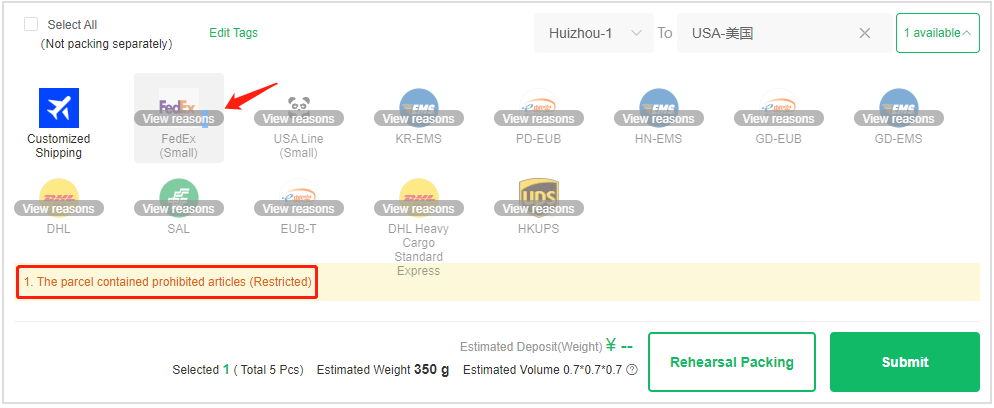
Choosing the Right Shipping Line for Your Needs
We offer a diverse range of shipping lines to suit every need and budget. You can choose the best option based on speed, cost, and tracking capabilities. The app will present you with all available lines for your destination, along with estimated delivery times and costs.
| Shipping Type | Primary Feature | Best For |
|---|---|---|
| Express Lines (e.g., DHL, FedEx) | Fastest delivery speeds | Urgent or high-value items |
| Tax-Free / IOSS Lines | Simplified customs process for certain regions | Avoiding unexpected import fees in supported countries |
| Economy Lines (e.g., EMS, SAL) | Cost-effective and reliable | Large, non-urgent hauls where budget is a priority |
Managing Your Finances on the App
The app provides a secure and transparent system for managing your funds. All transactions are clearly logged, so you always know where your money is going.
How to Top-Up Your CNFans Balance
All purchases and shipping payments are made using your CNFans balance. To add funds, go to the User Center and select the Top-Up option. We support various secure payment methods, including PayPal, credit cards, and Wise, offering flexibility and convenience. The funds are typically credited to your account almost instantly.
Understanding Fees and Charges
We believe in transparent pricing. The costs are broken down into two main stages:
- Item Payment: The cost of the product itself plus the Chinese domestic shipping fee (if any). This is paid when you place the order.
- International Shipping Payment: The cost to ship the consolidated parcel from our warehouse to you. This is paid when you are ready to ship your haul.
A small service fee is applied to cover our operational costs for purchasing, quality control, storage, and customer support. All fees are clearly displayed before you make any payment.
Advanced Tips for Power Users
For those who want to optimize their shopping experience further, CNFans offers powerful tools to plan and manage hauls with precision.
Leveraging the CNFans Shipping Calculator
Before you even buy an item, you can get a very close estimate of your shipping costs. The Shipping Calculator tool in the app allows you to input an estimated weight, destination country, and item category. It will then display the estimated costs for all available shipping lines. This is invaluable for budgeting your haul and deciding if a purchase is worth the total landed cost.
Organizing Your Hauls with a Specialized Tool
For serious shoppers managing large or frequent hauls, organization is key. To help with this, we offer the official CNFan Spreadsheet Tool. This web-based utility is designed to work alongside the app, allowing you to meticulously track items, log links, record prices in your local currency, and calculate total costs. It's the perfect companion for planning your shopping, comparing items, and maintaining a detailed history of your purchases.
Why Choose the CNFans App for Your Shopping?
In the world of shopping agents, the CNFans app stands out through a commitment to user experience, transparency, and robust features. We offer high-resolution QC photos as a standard, ensuring you know exactly what you're getting. Our interface is intuitively designed, making the entire process, from order to delivery, seamless even for absolute beginners.
With features like rehearsal shipping, a built-in shipping calculator, and a wide array of trusted shipping lines, you are given complete control over the cost and speed of your deliveries. Paired with responsive customer service and a secure platform, CNFans is more than just an agent; it is your trusted partner for accessing the vast and exciting market of Chinese e-commerce.
Frequently Asked Questions (FAQ)
How long can I store items in the warehouse for free?
We offer a 90-day free storage period for every item. This gives you ample time to consolidate orders from various sellers without any rush.
What happens if an item I order is out of stock?
If a seller informs us that an item is out of stock, our agent will notify you immediately via the app's message center. The full amount paid for that item will be refunded to your CNFans balance, which you can use for another purchase or withdraw.
Can I return an item if I don't like the QC photos?
Yes. If you are not satisfied with an item based on the QC photos (e.g., it has a defect or is the wrong size), you can request a return or exchange directly from the app. Our team will handle the communication with the seller. This must be done while the item is still in our warehouse.
What is a "haul"?
A "haul" is a community term for a collection of items that you have purchased and accumulated in the warehouse, which are then shipped together in a single parcel.