The QC.CNFans process is a critical pre-shipment inspection service where CNFans warehouse staff take detailed photographs of your purchased items upon their arrival. This visual verification allows you to assess the quality, accuracy, color, and condition of your products before they are shipped internationally, giving you the power to approve them for shipping or request a return/exchange if they don't meet your expectations.
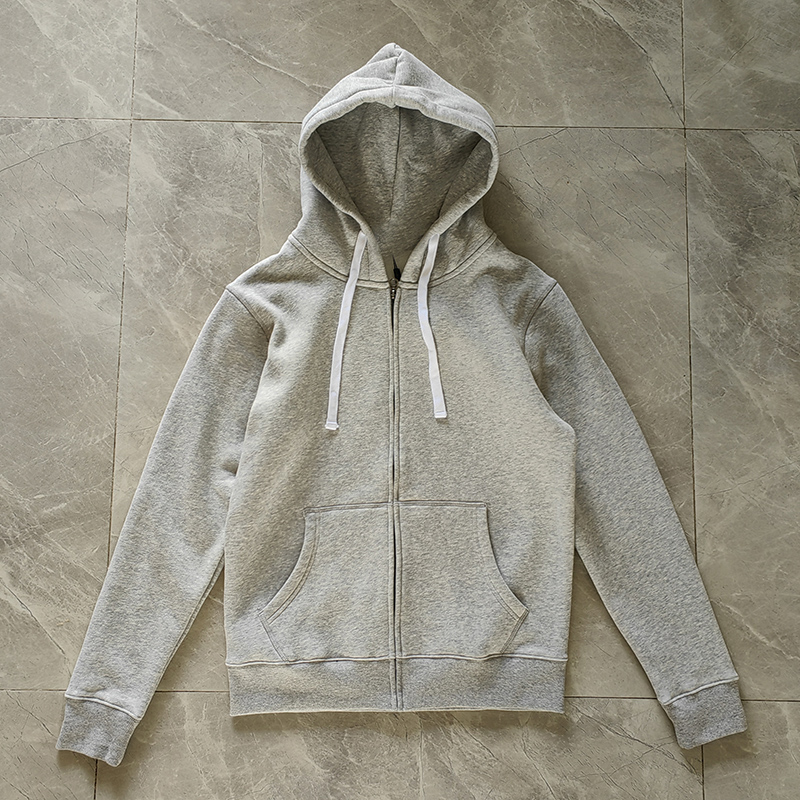
Table of Contents
- What Exactly is the CNFans Quality Check Process?
- Why is a Thorough Quality Check Essential for Your Orders?
- Navigating the CNFans Quality Check Interface
- A Detailed Checklist: What to Scrutinize in Your QC Photos
- How to Handle Flaws or Defects Found During Inspection
- Timing and Costs Associated with CNFans Quality Checks
- Advanced Tips for Mastering Your QC Inspections
- Managing Multiple QC Items and Orders Efficiently
- Common Mistakes to Avoid During the QC Phase
- Frequently Asked Questions about CNFans QC
What Exactly is the CNFans Quality Check Process?
The CNFans Quality Check, often referred to as "QC," is a fundamental service provided by the agent. When an item you've ordered from a seller like Taobao or Weidian arrives at the CNFans warehouse, the staff unpacks it and takes a set of standardized photographs. These images are then uploaded to your user account under the corresponding order. This visual inspection is your first and most important opportunity to verify the item you paid for is the item you received, and that it is free from obvious defects.
Think of it as a remote pair of eyes. Since you cannot physically handle the item yourself, these inspection photos serve as your primary tool for quality assurance. The process empowers you, the buyer, to make an informed decision: either approve the item and store it in your warehouse for future shipping, or flag an issue and request a resolution, such as an exchange or a full refund from the original seller. This step is a crucial buffer that protects you from receiving flawed or incorrect goods internationally, which would be far more costly and complicated to rectify.
Why is a Thorough Quality Check Essential for Your Orders?
Engaging with the quality check process is not just an optional step; it is a vital part of the international shopping experience. The primary benefit is risk mitigation. By identifying issues at the warehouse, you prevent the disappointment and financial loss associated with receiving a defective or incorrect item in your home country. International shipping is expensive, and returning an item from abroad is often impractical or prohibitively costly.
Furthermore, a meticulous check ensures you receive exactly what you intended to purchase. Discrepancies in color due to seller lighting, incorrect sizing, or subtle flaws in a logo or print are common. The QC photos are your chance to catch these problems. Approving an item without a proper check means you accept the product "as-is." A diligent inspection provides peace of mind and confirms the value of your purchase before you commit to the significant expense of shipping it across the globe.
Navigating the CNFans Quality Check Interface
Once an item arrives at the warehouse, you will be notified, and the QC photos will be available in your account. Understanding how to access and act on these photos is straightforward but requires attention to detail.
Requesting Standard QC Photos
CNFans typically provides a set of 3-5 standard photos for free with each item. These usually include:
- A shot of the item as a whole (e.g., a full view of a shirt or shoes).
- A close-up of a key detail (like a logo, tag, or specific design element).
- A picture showing the item on a scale to verify its weight.
- A picture of any packaging or tags included.
For many basic items, these standard photos are sufficient to confirm the general appearance and accuracy. You can view them directly from your "My Warehouse" or "Orders" section.
Understanding Additional Photo Services
What if the standard photos are not enough? For items where fit and specific details are paramount, such as high-end clothing or sneakers, you may need more information. CNFans offers a service for requesting additional, detailed photos for a small fee. You can ask for specific shots, such as:
- Measurement photos: Requesting a measuring tape be laid across the chest (pit-to-pit), length, or sleeve of a garment. For shoes, you can ask for an insole measurement.
- Close-ups of specific areas: You might want to see the stitching on a particular seam or the clarity of a small print.
- Photos in different lighting: If you are concerned about the exact color shade, you can request photos in what appears to be more natural light, although this can be subject to warehouse conditions.
These detailed requests are invaluable for making a confident decision on more expensive or intricate items.
A Detailed Checklist: What to Scrutinize in Your QC Photos
When your photos arrive, it's easy to feel overwhelmed. Having a systematic approach ensures you don't miss anything important. Break down your inspection into key areas.
Assessing Product Accuracy and Color
First, compare the QC photos to the original seller's images (stock photos) from the product page where you made the purchase. Does the item match what was advertised? Pay close attention to the color. Warehouse lighting can be harsh and can alter the appearance of colors. While minor shade differences are common, a completely different color (e.g., you ordered navy blue and received black) is a clear reason to request a return. Check for design accuracy; ensure all expected elements, patterns, and features are present.
Inspecting Stitching, Logos, and Prints
Zoom in on the details. This is where many quality issues become apparent. For garments, examine the stitching along seams, hems, and cuffs. Is it straight and consistent, or is it crooked and sloppy? For items with logos or branding, inspect them closely. Is the logo correctly spelled and centered? Is the embroidery clean, or are there loose threads? For printed graphics, check for clarity, sharpness, and any signs of cracking or peeling.
Verifying Sizing and Measurements
Sizing is one of the biggest challenges in international shopping. Never rely on tags like "M" or "L" alone, as sizing standards vary dramatically. This is where requesting measurement photos is crucial. Compare the measurements shown in the QC photos (e.g., chest, length) to a similar, well-fitting garment you already own. This is the most reliable way to determine if an item will fit you. For shoes, always request an insole measurement, as this is more accurate than the outsole or the size on the box.
How to Handle Flaws or Defects Found During Inspection
Discovering a problem in your QC photos can be disheartening, but it's precisely what the process is for. CNFans provides a clear pathway for resolving these issues with the seller.
The Process for Initiating a Return or Exchange
If you identify a significant flaw, an incorrect item, or a wrong size, you can initiate a return or exchange directly from the order page. There will typically be an option next to the QC photos to "Return" or "Exchange." When you select this, you will be prompted to provide a reason. Be clear and concise. For example, "Wrong size received" or "Stitching is defective on the collar." Your CNFans agent will then contact the original seller on your behalf to process the request. Keep in mind that the seller's return policy will apply, and you may be responsible for the domestic shipping fee to send the item back.
Communicating Effectively with Your CNFans Agent
Clear communication is key to a smooth resolution. When describing the issue, be specific. Instead of saying "the quality is bad," state exactly what is wrong: "The logo embroidery has multiple loose threads and is not centered." If possible, you can use a simple image editor to circle the defects on the QC photos and upload this annotated image with your return request. This provides undeniable visual evidence and helps the agent communicate the problem effectively to the seller, speeding up the entire process.
Timing and Costs Associated with CNFans Quality Checks
The standard set of QC photos is provided free of charge by CNFans. These are typically taken and uploaded to your account within 24 hours of the item's arrival at the warehouse. If you request additional photos, there is a small service fee per request, and it may take another day for these new images to be prepared.
When considering a return or exchange, be mindful of the timeline. Most sellers have a limited return window (often 7 days from delivery to the warehouse). It's important to check your QC photos promptly upon arrival to ensure you have enough time to act if there's a problem. The cost of a domestic return (the shipping fee from the CNFans warehouse back to the seller) is usually covered by the buyer unless the seller sent the wrong item entirely.
Advanced Tips for Mastering Your QC Inspections
Once you are comfortable with the basics, you can use more advanced techniques to ensure perfection. When ordering items like leather goods, you can request a close-up photo of the material's texture. For items with complex patterns, ask for a photo that shows the pattern alignment across seams. If you're buying a pair of items, such as shoes, specifically ask for photos of both items together to check for symmetry and consistency. Don't hesitate to be very specific in your additional photo requests; a small investment here can save a lot of trouble later.
Managing Multiple QC Items and Orders Efficiently
For shoppers managing large hauls with dozens of items, keeping track of each product's QC status, measurements, and approval can become a logistical challenge. Manually organizing this data in notes or separate documents is time-consuming and prone to error, leading to accidental approvals or missed return windows. This is where a dedicated organizational system is no longer a luxury but a necessity for efficiency.
This organizational complexity is precisely what specialized tools are designed to solve. For instance, the CN-Fan Spreadsheet provides a powerful solution by automating much of this process. It allows you to consolidate all your order information, track QC status for each item, log measurements, and manage your warehouse in a single, streamlined interface. By using such a tool, you transform a chaotic process into a structured workflow, ensuring no detail is overlooked and saving significant time that can be better spent finding your next great item.
Common Mistakes to Avoid During the QC Phase
Several common pitfalls can undermine the effectiveness of your quality check. The most frequent mistake is approving an item too quickly without a thorough inspection. The excitement of seeing your item can lead to a hasty click, but it's crucial to take a few minutes to perform your due diligence.
Another error is failing to request measurement photos for clothing and footwear. Relying on tag sizes is a gamble that rarely pays off. Similarly, avoid being vague in your communication. If you need to raise an issue, provide clear, specific details. Finally, don't forget to monitor the seller's return window. Delaying your QC review could mean you forfeit your right to a return or exchange, leaving you stuck with a flawed item.
Frequently Asked Questions about CNFans QC
How long does CNFans QC take after an item arrives?
Standard QC photos are generally taken and uploaded within 12-24 hours after the item is registered in the warehouse system.
What should I do if the QC photos are blurry or unclear?
If the initial photos are not of sufficient quality to make an assessment, you can contact CNFans customer service and request that they retake a specific photo. This is usually done at no extra charge if the original image is genuinely unusable.
Can I cancel a return request after making it?
Typically, once a return process is initiated and the agent has begun communicating with the seller, it can be difficult to reverse. It is best to be certain before you request a return. If you change your mind immediately, contact customer service right away to see if it can be stopped.